
UK Driving Instructor Software Apps Explained
Quick answer: a UK driving instructor software app helps ADIs and PDIs manage their diary, pupil records, lessons, mileage, payments, notes and progress tracking in one place. Instead of juggling a paper diary, spreadsheets, banking notes, manual mileage tracking and message threads, instructors can keep their day-to-day business organised from a mobile app.
This guide is for anyone searching for UK driving instructor software app diary pupil records lessons payments and trying to understand what actually matters before choosing a tool.
Why Driving Instructors Need Specialist Software
Driving instruction is not a simple booking business. Lessons move, pupils cancel, balances change, pickup locations vary and each learner progresses at a different pace.
A normal calendar can show that a lesson exists, but it usually cannot answer questions like:
- How many hours has this pupil completed?
- What did we cover in the last lesson?
- Has the pupil paid for the next block?
- Which pupils are close to test-ready?
- Who has an outstanding balance?
- Which gaps can I fill this week?
- What mileage or income did I record this month?
That is where dedicated driving instructor software becomes useful. It connects the diary to the pupil, the lesson, the payment and the progress record.
The Core Features to Look For
1. Lesson Diary
The lesson diary is the centre of any driving instructor app. It should make it easy to add lessons, repeat weekly bookings, block unavailable time, change pickup locations and see the day at a glance.
For UK ADIs, the diary needs to work quickly on mobile. You are often between lessons, in a car park or replying to a pupil after a cancellation. If the diary is slow or cluttered, the app will not last.
Look for:
- quick lesson creation
- repeating lessons
- availability and time blocking
- calendar sync where needed
- cancellation handling
- lesson reminders
- clear daily and weekly views
2. Pupil Records
Pupil records should keep the important information in one place: contact details, pickup addresses, notes, lesson history, payment status, licence details where needed and test information.
Good pupil records reduce the mental load of teaching many learners at once. Instead of trying to remember what happened last week, the instructor can check the pupil profile before the next lesson.
Look for:
- contact details
- lesson history
- notes and private notes
- pickup and drop-off locations
- progress status
- payment balance
- test dates or test notes
3. Lesson Notes and Progress Tracking
Progress tracking is what separates driving instructor software from a basic diary. Learners need structured feedback, and instructors need a consistent way to record what has been covered.
Some apps use a syllabus, progress percentage, reflective logs or lesson themes. The exact format matters less than consistency. The best system is the one you will actually update after lessons.
Look for:
- lesson notes
- reflective logs
- syllabus or skill tracking
- test-readiness indicators
- lesson summaries
- pupil-facing progress where useful
4. Payments and Balances
Payment tracking is one of the biggest admin headaches for instructors. Even when pupils pay by bank transfer, you still need to know who has paid, who has credit left and who needs a reminder.
Some driving instructor apps simply track payment records. Others support online or in-app payments. Before choosing, check whether the app records payments only, processes card payments, charges payment fees or exports data for accounts.
Look for:
- payment history
- outstanding balances
- lesson credit or prepaid hours
- income overview
- expenses or mileage records
- export options
- clear payment fees if online payments are included
5. Pupil Communication and Reminders
Missed lessons cost instructors real money. Lesson reminders can help reduce forgotten bookings, especially when learners have busy college, work or family schedules.
Useful communication features include:
- lesson reminder notifications
- payment reminders
- pupil app access
- lesson summaries
- shared notes
- rescheduling workflows
- gap booking or availability updates
The goal is not to message pupils more. The goal is to avoid repeating the same admin manually.
How Varium Fits This Category
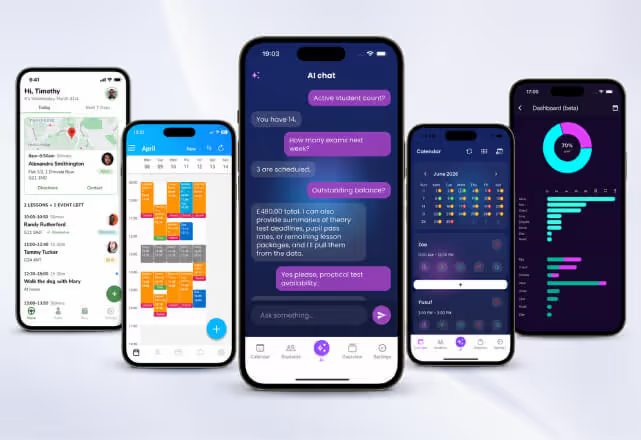
Varium is an AI-powered app for driving instructors and driving schools. It combines the main features instructors expect from UK driving instructor software: lesson diary, pupil records, notes, payments, mileage tracking and business insights.
Varium also adds an AI Driving Instructor Assistant. Instructors can ask questions about pupils, lessons, payments, tests and progress, which helps them find answers from their own records more quickly.
For example, instead of manually checking multiple pupils and lessons, an instructor may want quick answers such as:
- Which pupils have outstanding balances?
- What lessons are coming up today?
- Which pupil notes should I review before the next lesson?
- What does my recent lesson activity look like?
This makes Varium different from apps that only store information. Varium is designed to help instructors understand and use their information more easily.
Common UK Driving Instructor App Options
Several apps serve the UK ADI and PDI market.
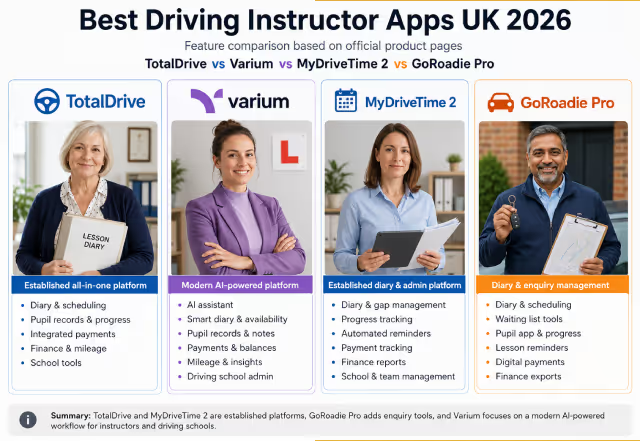
Varium focuses on a modern instructor workflow, bringing diary, pupil records, payments, mileage, business insights and AI-powered admin support together, offering multilingual support.
Total Drive is an established all-in-one driving instructor app with diary, pupil and parent app, progress syllabus, reflective logs, finances, reminders and optional booking or teaching-aid features.
MyDriveTime is a mature UK app with diary management, lesson management, finance tools, pupil progress, student app features and a strong emphasis on support and reliability.
GoRoadie Pro combines diary management with enquiry handling, a live waiting list, pupil overview, learner app, reminders and payment/finance tools.
Lesson Diary is a lower-cost option focused on scheduling, pupil management, progress notes and payment tracking.
The best choice depends on whether your main problem is diary control, pupil progress, payments, school management or reducing admin with newer tools like AI.
When to Use an App Instead of a Spreadsheet
A spreadsheet can work when you have a small number of pupils, although it’s not advisable. And it becomes risky as your diary fills up.
Use a driving instructor software app when:
- you teach several pupils every week
- you regularly forget who has paid
- you need better lesson notes
- you want pupils to see progress
- you want fewer missed lessons
- you are preparing for cleaner accounts
- you want to spend less time updating records manually
The value of the software is not just the monthly price. It is the time saved, lessons not missed and records kept clean.
Checklist Before Choosing a UK Driving Instructor App
Before committing, test the app in a normal working week. Add real pupils, real lessons and real payments. Then ask:
- Can I add or move a lesson in seconds?
- Can I find a pupil’s progress without digging?
- Can I track balances clearly?
- Can I record notes after a lesson quickly?
- Can I export what I need for accounts?
- Does the pupil experience feel professional?
- Does it work well on my phone?
- Does the support feel reliable?
A long feature list does not always mean the app is right for you. The best driving instructor app is the one you keep using after the first week.
Final Thoughts
UK driving instructor software should make everyday admin easier. The essentials are simple: diary, pupil records, lessons, payments, notes and progress tracking.
If you want a modern app that brings those features together with AI-powered support, Varium is worth trying. If you want to compare the wider market, also look at Total Drive, MyDriveTime and GoRoadie Pro so you can choose the workflow that best fits your driving school.