

Request and approve driving lessons
How lesson requests work
When an instructor enables requests, pupils can choose from offered times and send a request. The instructor must approve it before it becomes a booked lesson. For school pupils, available instructors are filtered to eligible school instructors.
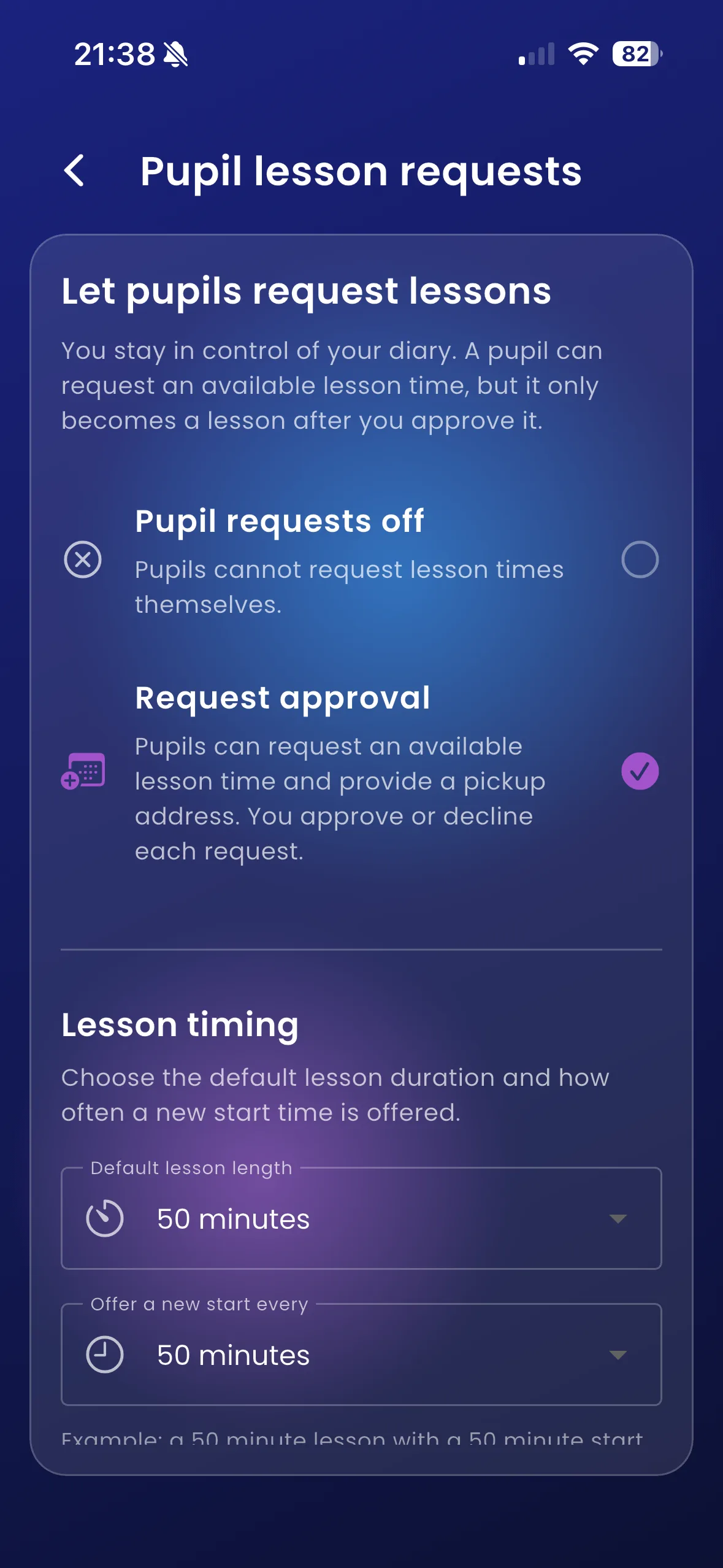
Instructor: enable lesson requests
The screenshot below shows the instructor’s request mode setting. Selecting request approval allows pupils to propose a time; the instructor still decides whether to accept.
For pupils
- Open Calendar and choose Request lesson.
- If asked, choose your instructor.
- Choose an available time in the next seven days.
- Enter the pickup address and review the selected lesson.
- Select Send lesson request and wait for confirmation.
- Check the request status and Calendar before assuming the lesson is booked. Use the withdrawal action if you no longer want a pending request.
For instructors
Open Calendar → Lesson requests, review the pupil, requested time and pickup address, then approve or decline. The app checks availability again when handling the request.
For example, a pupil requests Thursday at 14:00 and specifies a college pickup. That address applies to this lesson; it does not replace the pupil’s normal address.
Important things to know
The Flutter settings support requests being off or approval-based. Do not assume instant booking is available because a server supports another mode. Notification alerts depend on build availability and permissions; the request list is the place to check decisions.
Troubleshooting
If the time is no longer available, refresh and choose another. If no instructor accepts requests, contact your school. Avoid repeatedly sending the same request after a slow response; check its status first.
Related features
Availability · Cancellation requests · Request notifications